Introduction
Robot vacuums have gone from a novelty gadget to a standard household appliance in less than two decades. Millions of homes now rely on a small disc-shaped machine to keep floors clean without anyone pushing a handle.
But behind the simple act of pressing a button lies a surprisingly complex system of sensors, motors, algorithms, and mechanical parts working together in real time. This article breaks down exactly what happens inside a robot vacuum, from the moment it leaves its dock to the moment it returns home, fully aware of every inch of floor it has covered.
01. How Does a Robot Vacuum Work in General?
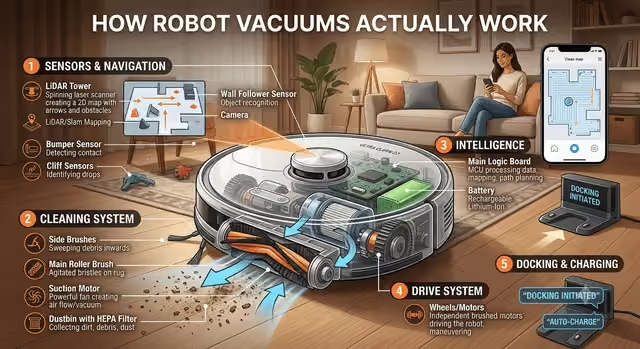
At its core, a robot vacuum is a small, self-powered machine built around four main systems: mobility, sensing, cleaning, and power management. A set of wheels, usually two large drive wheels plus a smaller caster wheel, moves the unit across the floor. A rechargeable lithium-ion battery powers everything, from the motors to the onboard computer chip that processes data and makes decisions dozens of times per second.
That onboard computer is the real brain of the operation. It constantly receives input from sensors, compares it against a stored or evolving map of the home, and decides which direction to move next. Meanwhile, a suction motor pulls air and debris through an inlet, brushes agitate dirt from carpet fibers and hard floors, and a dustbin collects everything that gets picked up. All of this happens autonomously: the robot decides where to go, when to turn, when to avoid an object, and when its job is finished, without a person guiding it step by step.
03. Sensors, Cameras, and LiDAR
The specific hardware a robot vacuum uses to perceive its surroundings varies significantly between brands and price tiers, but three technologies dominate the market.
1. LiDAR (Light Detection and Ranging)
LiDAR is found in most higher-end models. A small spinning turret on top of the robot, easily recognizable as a raised bump, emits laser pulses hundreds of times per second and measures how long each pulse takes to bounce back off nearby objects. Because the speed of light is constant, this timing reveals precise distances to walls and furniture in every direction, letting the robot build a highly accurate 360-degree map even in complete darkness.
2. Camera-Based (vSLAM) Navigation
Visual SLAM takes a different approach. A forward-facing or upward-facing camera captures images of the environment, and computer vision algorithms identify distinctive visual landmarks—a ceiling light fixture, the edge of a rug, a table leg—and track how those landmarks shift position as the robot moves. This method is generally cheaper to manufacture than LiDAR, but it depends on adequate lighting and can struggle in dark rooms.
3. Secondary Sensors
Beyond the primary navigation sensor, robot vacuums pack in a range of secondary sensors. Infrared and ultrasonic sensors detect nearby obstacles before physical contact occurs. Bump sensors on the front edge register a light collision. Cliff sensors, positioned on the underside of the robot, fire infrared light downward and measure the reflection; if the reflection takes too long to return, the robot recognizes a drop-off, such as a staircase, and immediately halts or reverses. Many premium models now add small stereo or structured-light cameras dedicated purely to obstacle recognition, distinguishing between a sock, a pet's water bowl, and a charging cable so it can react appropriately to each.
04. How Does It Avoid Obstacles and Falls?
Obstacle avoidance runs as a constant background process, layered on top of the main navigation system. As the robot moves, its sensors feed a steady stream of distance readings to the onboard processor. When an object appears within a set threshold, usually a few centimeters, the robot slows down, and if contact still occurs, the bump sensor registers it and the robot recalculates its path around the object.
More advanced systems use object recognition trained on machine learning models to identify specific household hazards before they become a problem. Instead of simply detecting "something is here," the robot can distinguish between a shoe it should steer around, a thin phone charging cable it might otherwise get tangled in, and pet waste it should avoid entirely rather than smear across the floor. This is typically marketed under names describing AI-powered or smart obstacle avoidance.
Fall prevention relies almost entirely on the cliff sensors described earlier. These sensors check the floor distance continuously, dozens of times per second, so the robot detects an edge before its wheels reach it. This is why robot vacuums can safely clean near open staircases without needing a physical barrier, though many users still choose to set virtual no-go zones through the companion app as an extra safety layer, particularly for balconies or open landings.
05. How Does It Clean and Vacuum?
The cleaning mechanism relies on a combination of airflow and mechanical agitation. A motor spins an impeller at high speed, creating a pressure difference that pulls air, along with dust and debris, through the intake at the front or bottom of the robot. That airborne debris travels through a series of filters, typically a pre-filter to catch larger particles and a HEPA-grade filter to trap fine dust and allergens, before clean air is expelled back into the room.
Suction power alone is not enough to lift embedded dirt out of carpet fibers, which is why nearly every robot vacuum pairs suction with rotating brushes. Most models let the user or the app adjust suction strength based on the surface: lower power for hardwood or tile to save battery, higher power for carpets and rugs where dirt sits deeper in the fibers. The robot's own sensors can often detect the change in surface type, through a drop in wheel resistance or a dedicated carpet-detection sensor, and automatically boost suction the moment it transitions from a hard floor onto a rug.
06. How Do the Brush and Mop Work?
Most robot vacuums use a main brush roll positioned along the width of the intake. This roll is typically made from a mix of rubber fins and bristles, designed to agitate carpet fibers and sweep debris from hard floors directly into the suction path. Rubber-only rolls have become increasingly common because they resist hair tangling better than bristle brushes, a significant advantage for households with pets or long hair.
A separate side brush, a smaller spinning brush mounted near one front corner, extends outward and sweeps debris from wall edges and tight corners into the path of the main brush roll. Without it, robot vacuums would struggle to clean along baseboards, since the round or D-shaped body cannot reach flush against a straight wall.
Mopping robot vacuums add a water reservoir and a cleaning pad, usually microfiber, attached to the underside of the unit. Basic models rely on gravity or a simple wicking system to keep the pad damp as the robot glides over hard floors. More advanced hybrid models use an electronically controlled pump to regulate water flow precisely, and some can even lift the mop pad automatically when the robot detects carpet, preventing wet cleaning cloths from soaking into rugs.
07. How Does It Know When It Has Finished Cleaning?
The robot tracks its progress against the map it built at the start of the session, marking each section as cleaned once it has passed over that area. Once every accessible zone on the map has been covered, or once the user-defined cleaning zone is fully marked, the robot considers the job complete and returns to its dock.
Battery level plays an equally important role in this decision. If the battery drops below a set threshold before cleaning is finished, the robot pauses its coverage plan, navigates back to the charging dock using the map it has already built, recharges to a sufficient level, and then resumes cleaning from exactly where it left off rather than starting the whole area over again.
08. How Does the Charging Dock and Self-Emptying Work?
The charging dock emits an infrared or radio signal that acts as a homing beacon. When the robot's battery runs low or its cleaning cycle ends, it uses this signal alongside its internal map to navigate directly back to the dock, adjusting its approach angle as it gets close so its charging contacts align precisely with the dock's charging pins.
Higher-end docks add a self-emptying function. After docking, a more powerful secondary motor inside the base station activates and vacuums the contents of the robot's small onboard dustbin into a larger bag or bin housed in the dock itself. This process typically takes ten to fifteen seconds and lets the robot handle several cleaning sessions, often a month's worth, before a person needs to empty anything by hand. Some premium docks extend this same automation to mop pads, using heated water to rinse and dry the pad, and warm air to prevent mildew buildup between cleaning sessions.
09. The Role of AI and Mapping
Artificial intelligence has become central to how modern robot vacuums operate, well beyond basic navigation. Machine learning models trained on large image datasets allow the robot's camera to recognize and categorize objects in real time, distinguishing a charging cable from a stray sock, or a pet from a piece of furniture, and reacting differently to each.
AI also improves mapping over successive cleaning sessions. Rather than treating every run as a fresh start, the system compares each new map against previous ones, refining wall boundaries, correcting for moved furniture, and improving overall accuracy the more the robot cleans. Some manufacturers use this accumulated data to offer smarter scheduling, suggesting which rooms need more frequent attention based on historical dirt levels, or adjusting cleaning patterns for high-traffic areas like hallways and entryways versus rarely used rooms like guest bedrooms.
10. Do Different Models Work Differently?
Yes, the underlying approach varies considerably by price tier and manufacturer. Here's a quick comparison of how different tiers operate:
| Feature | Entry-Level | Mid-Range | Premium |
|---|---|---|---|
| Navigation | Bump & Random | LiDAR or vSLAM | LiDAR + AI Camera |
| Mapping | No map | Single-floor map | Multi-floor mapping |
| Obstacle Avoidance | Bump sensors only | Infrared + bump | AI object recognition |
| Dock | Basic charging | Charging dock | Self-emptying + mop wash |
| Cleaning Pattern | Random bounce | Methodical rows | Adaptive AI patterns |
11. Conclusion and Tips for Choosing
A robot vacuum is really a small, self-contained robotics platform: it maps its environment, localizes itself within that map, avoids obstacles and hazards, cleans through a combination of suction and brushes, and manages its own power supply — all without human input during the cycle itself. Understanding these systems makes it much easier to evaluate which features actually matter for a given home.
Step-by-Step Guide to Choosing:
- Prioritize Navigation Technology — Choose LiDAR or a comparable camera-based navigation system over budget random-bounce robots if your home has multiple rooms or a complex layout.
- Consider a Self-Emptying Dock — Essential for larger homes or households with pets, where dust and hair accumulate quickly. Reduces maintenance to once a month.
- Look for Mopping Features — If hard floors are common in your home, look for adjustable or automatic mopping with electronic water pumps and mop-lifting on carpets.
- Check the Companion App — Ensure the app supports no-go zones and room-specific scheduling. These software features often matter more to daily satisfaction than raw suction power.
- Consider Multi-Floor Mapping — If you live in a multi-story home, choose a robot that can store and switch between multiple floor maps automatically.
Frequently Asked Questions
Quick answers to the most common questions about how robot vacuums navigate, clean, and manage themselves.
How does a robot vacuum work in general?
A robot vacuum is a small, self-powered machine built around four main systems: mobility, sensing, cleaning, and power management. Drive wheels move the unit, a lithium-ion battery powers everything, an onboard computer processes sensor data, and a suction motor with brushes cleans the floor autonomously.
How does a robot vacuum navigate and determine its location?
Robot vacuums use SLAM (Simultaneous Localization and Mapping) to answer two questions: where am I, and where have I cleaned? They combine wheel encoders, gyroscopes, accelerometers, and cross-reference fixed points like walls and furniture to build accurate grid maps of the home.
What is LiDAR in robot vacuums?
LiDAR (Light Detection and Ranging) is a navigation technology in higher-end robot vacuums. A spinning turret on top emits laser pulses hundreds of times per second and measures bounce-back time to calculate precise distances, building an accurate 360-degree map even in complete darkness.
How do robot vacuums avoid obstacles and falls?
Robot vacuums use infrared, ultrasonic, bump, and cliff sensors. AI-powered models use machine learning to recognize specific objects like shoes, cables, and pet waste. Cliff sensors fire infrared light downward to detect stairs and drop-offs dozens of times per second.
How does a self-emptying robot vacuum dock work?
After docking, a powerful secondary motor inside the base station vacuums the contents of the robot's small dustbin into a larger bag. This takes 10-15 seconds and lets the robot handle up to a month of cleaning sessions before manual emptying is needed.